Webex Leverages AGNTCY Directory and Identity for Agentic Apps
February 27, 2026
Enterprises are accelerating their use of artificial intelligence (AI) assistants and agentic workflows across both employee collaboration and customer service operations. Whether it’s an agent that autonomously troubleshoots a network via Meraki APIs or a virtual project manager that updates Jira tickets based on a Webex meeting summary, the Webex ecosystem is the premier destination for enterprise-grade agents.
Building a scalable, enterprise-grade agentic platform enables Webex products and services to operate as both providers and consumers of AI-driven capabilities. Webex platform leverages open agentic standards such as Model Context Protocol (MCP), Agent2Agent (A2A), and AGNTCY (a Linux Foundation project founded by Outshift by Cisco), to help enterprises deploy trusted, interoperable, and collaborative AI agents at scale.
Building on our earlier collaboration with AGNTCY to pilot a multi-vendor, multi-agent collaboration for a healthcare contact center use case, Webex has now integrated AGNTCY directory and identity components into its Agent Central Service (ACS) to enable trusted discovery and authentication of agentic apps (starting with MCP servers) onboarded to Webex developer portal and Webex App Hub.
Webex Developer Portal and App Hub: Agentic integration
The Webex Developer Portal is a unified platform providing APIs, SDKs, and tools that enable developers to build apps for Webex Suite (meetings, messaging, calling) and Contact Center, whereas the Webex App Hub is the Webex marketplace for discovering and distributing agentic apps. The AGNTCY Directory service provides a standardized capability for registration, search, and resolution of various agentic resource records across the Webex ecosystem for both internal and external agentic services. While the AGNTCY Identity service issues verifiable credential issuance, validates signatures, and provides interoperable agentic resources’ identity resolution to enable trusted authentication and interoperability across ecosystems.
Integrating these capabilities in the Webex platform delivers the following key benefits:
- Common governance and security layer: Single governance framework instead of separate controls per product or integration—reducing risk, compliance complexity, and operational overhead.
- Agentic interoperability: Webex products and external AI agents can discover, call, and collaborate with each other. It supports external agent / MCP server consumption and Webex agents / MCP servers' invocation.
- Discoverability and market exchange: Customers can activate approved agents/tools on demand instead of building from scratch. This improves time to market and enables ecosystem choice, innovation, and future extensibility.
Architecture
Agent Central Service
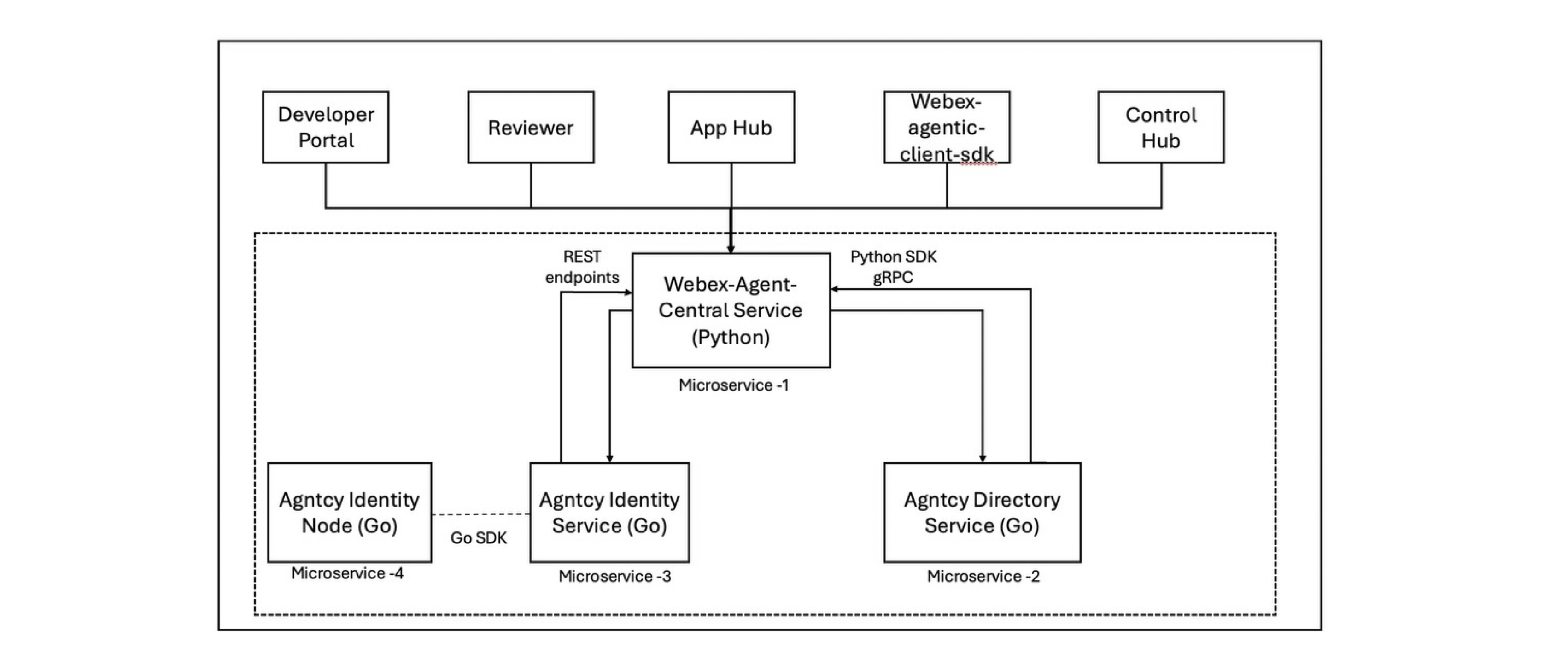
The Webex Agent Central Service (ACS) is the governance and discovery backbone of the Webex Agentic Ecosystem. It provides a trusted, scalable, and developer-friendly foundation for registering, certifying, and managing agentic servers.
ACS now integrates AGNTCY directory and identity components for registration, discovery, and verification of internal and external MCP servers. This integration allows ACS to function as the enterprise governance control plane while leveraging AGNTCY’s open, interoperable agent infrastructure.
ACS introduces governance and compliance controls over all registered agentic servers—whether internal or third party—ensuring that only verified and policy-compliant servers participate within the ecosystem. It supports both MCP and A2A server registration (future) and enables their publication through the App Hub marketplace.
These server records are internally stored in AGNTCY directory service in a standardized Open Agent Schema Framework (OASF) format providing for skills-based discovery, content addressed records for integrity, and verifiable claims for recording signing and verification.
ACS uses the AGNTCY identity as the central hub for managing and verifying digital identities for agentic apps. The AGNTCY identity service is used to issue agent badges during agent app registration and then subsequently to verify the badges upon use. Identity badges are classified as:
- Cisco Official (Certified by Cisco)
- Cisco Onboarded (Developed by XYZ; Certified by Cisco)
- Developer/partner Onboarded (Developed by XYZ; Reviewed by Cisco)
- Federated through external registry (Developed by XYZ; Imported from external registry)
Control Hub
Through Control Hub integration, administrators can define and enforce enterprise policies across registered servers and internal agentic functions. These policies are automatically applied to all consumers of the ecosystem, including the Webex Agentic Client SDK and Webex Agentic Server, ensuring consistent governance and compliance enforcement.
The Client SDK, used internally by Webex products, leverages ACS for secure access to policy-enforced servers and functions supporting MCP and A2A use cases.
Additionally, ACS integrates with the Developer Portal to onboard agentic servers from partners and third-party developers, maintaining a continuously updated registry accessible to all ecosystem participants.
How it works
If you are a developer ready to bring your agent to the world, here is your roadmap for onboarding via the Webex Developer Portal and App Hub.
anchor1 . Developer Portal Onboarding
anchorRegister an Agentic Server (MCP/A2A) for use within an organization and optionally for public listing.
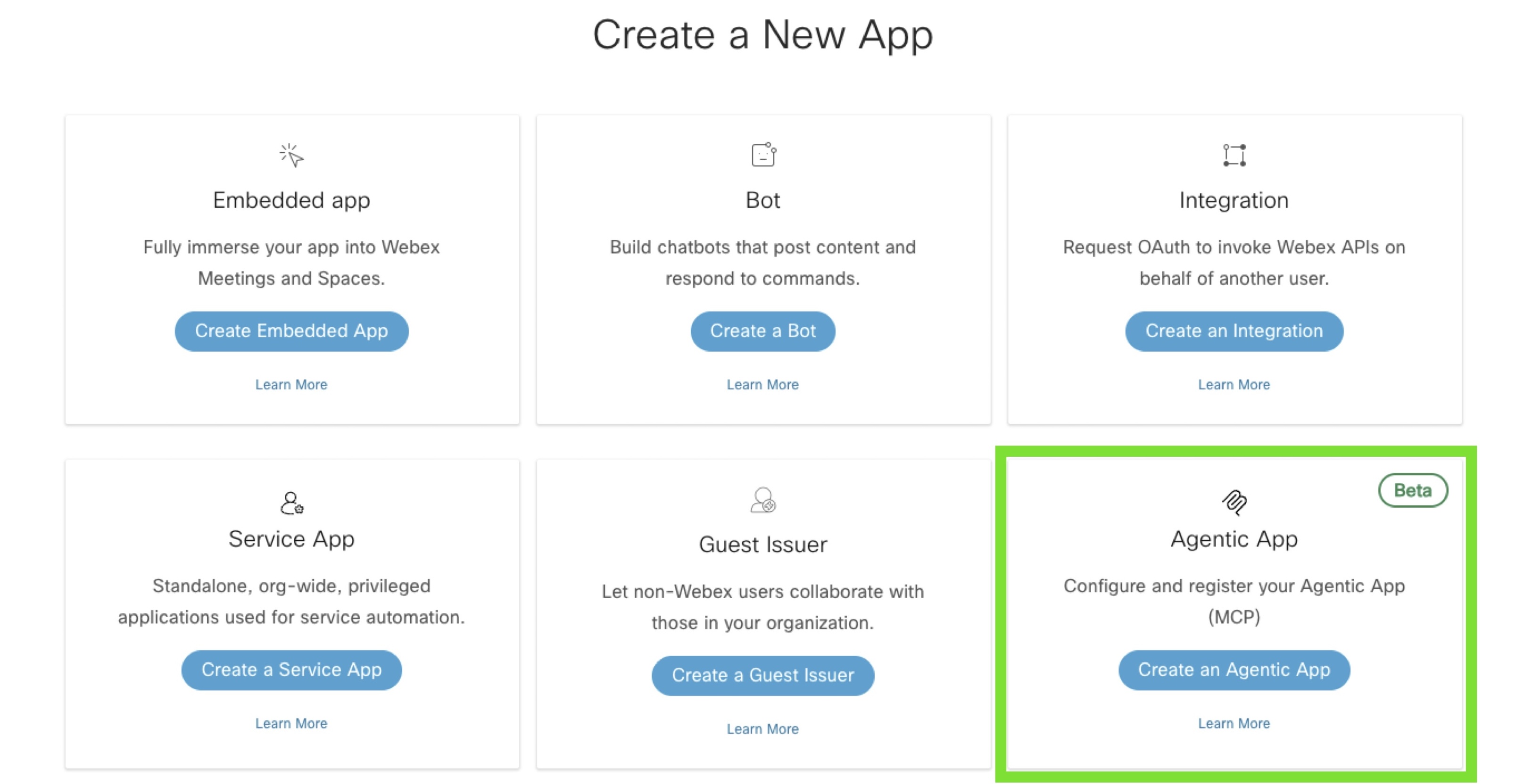
User will open Developer Portal and click on start building Apps. Once the user clicks on new Agentic App and fills metadata (name, description, server URL, module, auth type). Click on submit and new Agentic App is created. User can optionally submit for App Hub Approval.
anchor2. App Hub Marketplace
anchorBy onboarding your agentic app onto the Webex App Hub, you aren't just publishing a tool—you are joining a secure, resilient ecosystem designed for the future of work.
Watch a video that demonstrates the workflow up to here: Vidcast
anchor3. Provisioning through Control Hub
anchorControl Hub is used for provisioning. In the Control Hub section, once the user goes to Apps section and clicks on Agentic Apps, they can view a list of Agentic Apps. Server details will have tabs for:
- Overview: Discover Agentic Servers (public and org-private) for an org admin.
- Tools: View server metadata and tool inventory. Enable/disable the MCP server at org/group scope.
- Auth configuration: Enable/disable and select enabled tools per server. Provide access to limit set of users.
- Custom parameters: Configure server auth parameters and custom parameters.
Watch a video that demonstrates this workflow: Vidcast
Future Outlook
Looking ahead, Webex plans to leverage additional AGNTCY directory and identity services capabilities to enable:
- Policy-based, automatic federation of agent records from external agent registries such as the Anthropic MCP Server registry. This allows partners to register and sync their agent records to the Webex developer portal and app hub in a trusted and automated manner and Webex agent users to access a broad set of trusted, up-to-date agent apps that they can use in their agentic workflows.
- Run-time agent resource discovery and record ingestion. This allows Webex users to automatically discover and register running agent resources they created in Webex to the ACS agent registry (powered by AGNTCY directory). This helps keep the agent records up to date for more accurate agent discovery and set-up of granular access control permissions on agent tools, skills, and capabilities.
In addition to these AGNTCY capabilities, Webex is also looking to add support for A2A client and registration of agents in addition to the support for MCP servers today.
Getting started
Ready to start building? Head over to the My Apps page to register your first agentic app today. Join the Webex Developer Community and let’s build the future of Connected Intelligence together.
To learn more about AGNTCY, visit the AGNTCY GitHub. You can also use Directory, Identity, and Observe to enable interoperable multi-agent discovery, authentication, authorization, and observability.